
// Desktop organiser
ViPad
Clear your desktop. Keep everything.
If your desktop has turned into a wall of icons you can't find anything in, ViPad is the fix. You get labelled areas sitting on your wallpaper — Games, Work, whatever you want to call them — and everything goes into those instead. One right-click pulls in every shortcut you've already got. Then the originals disappear and you're left with a desktop you can actually think in.
There are two ways to arrange it, and you can mix them. Separate pads spread across the desktop, one per category, the way you'd use fences. Or one pad with named tabs, holding everything in a single panel. Most people end up doing both — a big pad for tools, a small one for games in the corner, tabs inside whichever gets full.
Free, no sign-up, no bundled extras. Direct link to the installer if you'd rather skip a step.
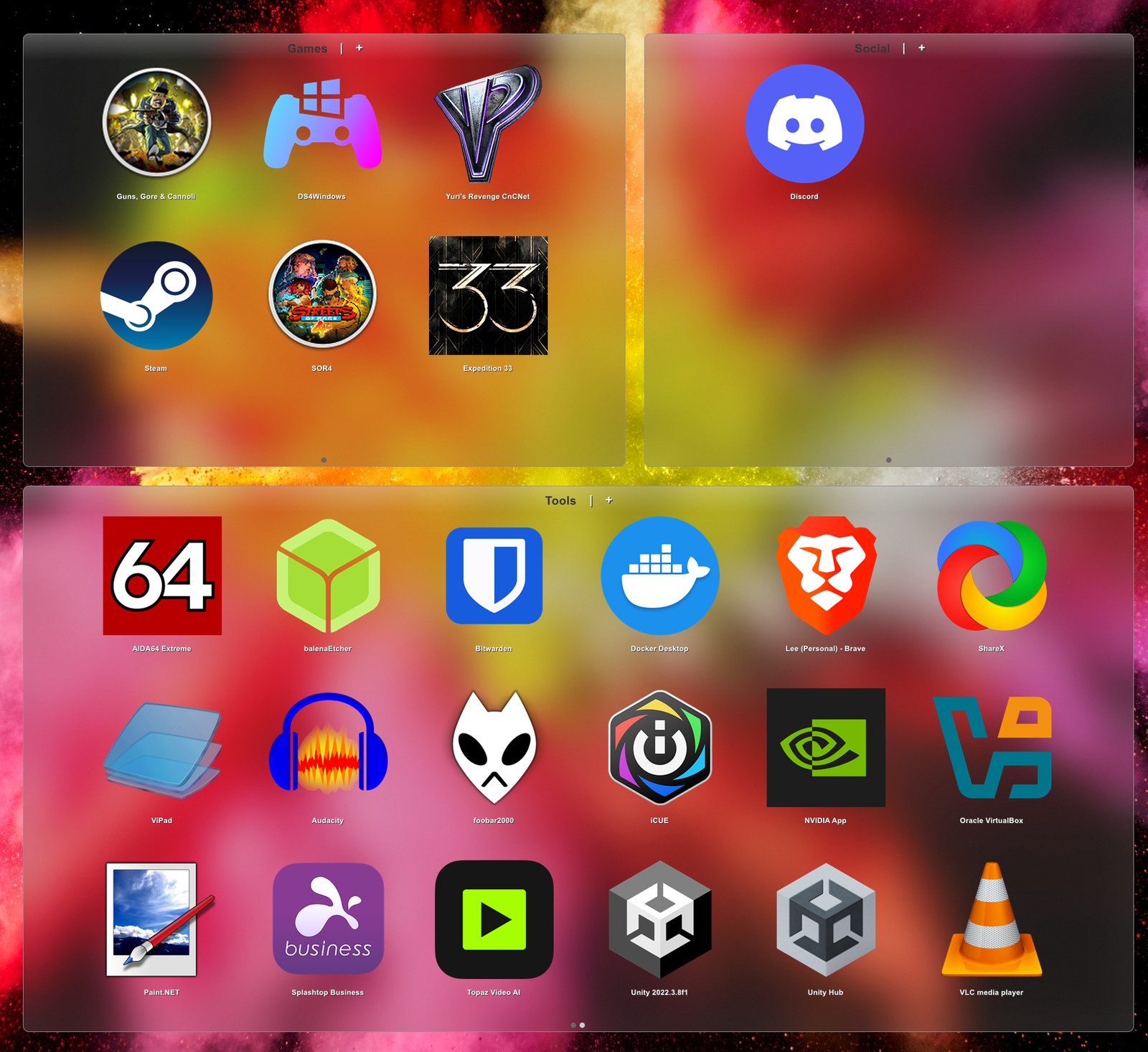
It's free. Not free-for-30-days, not free-with-an-account — free, and the source is on GitHub. I've been giving this stuff away since 2007 and I'm not about to start charging for it now.
Here for a Fences alternative? Yes — mostly
A lot of people land here after searching for a free alternative to Stardock Fences or Nimi Places. Short answer: ViPad does the same job. Longer answer, because you should know exactly what you're getting before you download anything —
What you're probably after, and ViPad does: labelled groups that live on the desktop, one right-click to import every shortcut you already have, the real desktop icons hidden underneath, tabs and pages inside each group, and a search box that filters as you type. It holds files, folders and web links as happily as it holds apps.
What Fences still does that ViPad doesn't: sorting rules that file new items automatically as they appear, double-clicking the desktop to roll everything away at once, and snapshot-and-restore of desktop layouts. If those three are the reason you're looking, Fences does them well and it's worth its money. They're on my list, but I'd rather you knew now than found out after installing.
And one thing ViPad does that Fences doesn't: Fences arranges regions across your wallpaper, and that's the shape it has. ViPad does regions or a single tabbed panel, or both at once — so if what you actually wanted was everything in one place rather than tidier sprawl, that's a setting, not a different program. It's also under a megabyte, open source, and free.
There's a full feature-by-feature comparison here →
What it does
- As many pads as you like, each named, each with its own tabs and pages — spread them out like fences, or keep everything in one.
- Add Desktop Shortcuts — right-click a pad and it pulls in everything on your desktop, skipping anything already there. Run it as often as you like.
- Hide Desktop clears the icons underneath, so all you see is the pads and your wallpaper.
- Live keyword search that filters as you type, and auto-pagination when a pad fills up.
- Real Windows 11 glass — genuine acrylic blur, rounded corners and a hairline border, with darkness, sheen and border sliders you can tune live.
- Optional snap-to-grid when you move or resize a pad, with an adjustable grid size.
- Icon sizes from small to frankly absurd (up to 256×256), and touch gestures for swiping between pages.
%appdata%\ViPad\settings.xmlexposes everything, for people who'd rather edit by hand.
Where it stands
Current build: 2.0.0.44. Runs on Windows 11, 10, 8 and 7 — the glass needs Windows 10 or later, and everything else works the whole way back. What changed in this release →
VB6 codebase at github.com/lee-soft/ViPad, and as of this release it builds from a clean checkout again — the public repo had been referencing a DLL that no longer existed anywhere. .NET port not started.
Some places ViPad turned up
"It helps you in organizing all your shortcuts easily and efficiently." — AskVG
"During testing, we marked the Hide Desktop and Stick to Desktop options in the settings and maximized the application to full-screen mode, and simply put it looked awesome." — AddictiveTips
Free, no sign-up, no bundled extras. Direct link to the installer if you'd rather skip a step.
Records the answer and nothing else — not your address, not a cookie, no way back to you.