
// Experimental — pre-1.0
ViFind
A macOS-style menu bar for Windows.
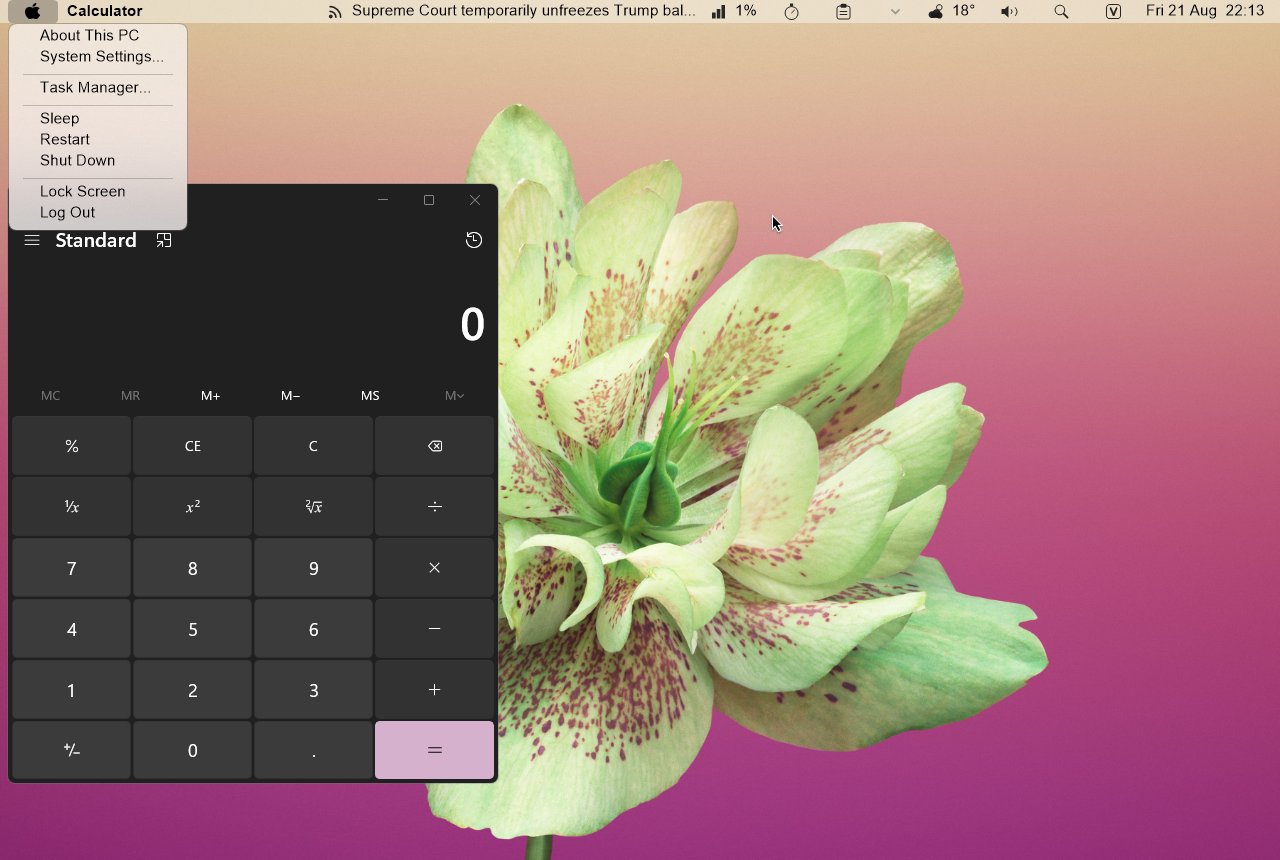
ViFind puts a Mac-style menu bar across the top of your screen. The focused application's own menus — File, Edit, whatever it has — get lifted up into it, the way they are on a Mac. On the right sits a row of widgets: a clock with a month calendar, the weather, CPU and memory, volume, clipboard history, a timer, news headlines and a search button.
The bar and every menu that drops out of it are real glass — acrylic drawn by Windows itself, with rounded corners and a proper shadow, rather than a bitmap doing an impression of translucency. That is the whole reason this release exists.
What it does
- A menu bar pinned across the top of the screen, in real acrylic glass.
- Lifts the menus out of whatever window you're using and shows them up there.
- Its own menu on the left, in the place the Apple menu lives — sleep, restart, shut down.
- Widgets on the right: clock and calendar, weather, CPU and memory, volume, clipboard history, timer, news, and a search button that opens Windows Search.
- Your notification-area icons, mirrored onto the bar.
- One skin file you can edit —
Resources\theme.xml— where every value has a sensible default, so nothing you delete can break it.
It needs Windows 10 or 11
Worth saying plainly, because the old build didn't have this limit. The glass is drawn by Windows' own compositor, which arrived in Windows 10 — there is nothing on Windows 7 or 8 to draw it with, and no sensible way to fake it that wouldn't look worse than not shipping. The installer checks and stops, rather than installing something that can't start.
Where it stands
Current build: 0.0.0.244, Aug 2026. The version number is honest — this has never reached 1.0 and there are rough edges — but it is being worked on again, and the previous release was 2018.
If you tried ViFind on Windows 11 before now and nothing appeared, that wasn't you. The old build crashed on startup every time: it looked for your notification-area icons in a window Windows 11 no longer has, and died before drawing anything at all. That's fixed.
It began in February 2016 as the "El Capitan Menu bar", a reunion project with Lucifiar after a few years apart. The GitHub repo is still called ViDock, after the dock it grew out of — same project, different names, one binary. It's VB6, it's open source, and pull requests are welcome.
Free, no sign-up, no bundled extras. Direct link to the installer if you'd rather skip a step.
Records the answer and nothing else — not your address, not a cookie, no way back to you.